


 中文简体
中文简体
紫外绿光激光器打标机常见问题及修复之一无法找到加密狗
Release time:2021/09/15
紫外绿光激光器打标机常见问题及修复之一无法找到加密狗

用户在使用激光打标机的时候,无论是新手还是老手,多少总是会遇到一些让人措手不及的问题,机器设备一旦出现问题可不是儿戏,轻则设备返厂维修,重则停机状态影响生产,不能按时完成交期,上上下下焦头烂额,心急如焚,之所以会遇到这样的状况,排除机器设备本身硬件故障问题之外,其实还有一些小问题是我们可以自己分分钟解决的,现在小编就带着大家逐一了解一下常见发生的问题以及修复的方法吧,今天主要教大家在安装打标软件时,无法找到加密狗应该怎么办?
“无法找到加密狗”,如图:
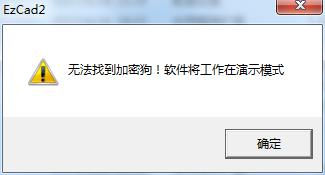
图1-4 常见问题
打开软件后就弹出上图对话框,显示“无法找到加密狗!软件将工作在演示模式”,此信息表示打标机软件没有找到控制板卡即打标机板卡。
修复办法:1、检查USB通讯线有没有插好,然后更换USB通讯线、更换USB插口。
2、调整板卡供电开关电源输出电压,使板卡电源电压为5V。
3、如若现场有大量的电磁干扰,将板卡接地等。
(2)“Can not open correct file!”,如图:
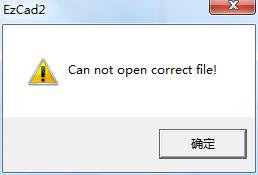
图1-5 常见问题
打开打标软件后如果出现这样对话框,这表示“无法打开校正文件”。
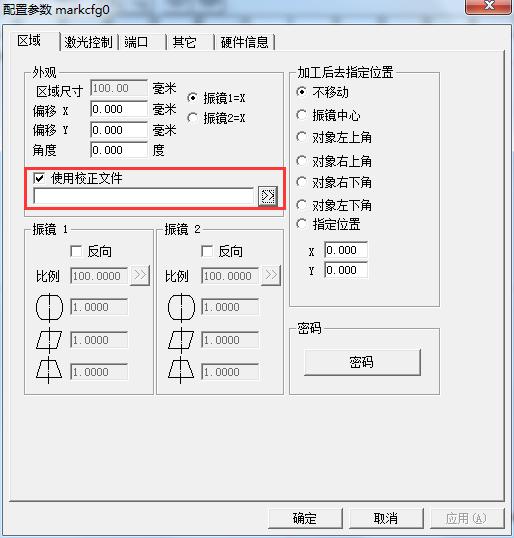
修复办法:1、导入路径正确的校正文件,如若没有校正文件,在F3参数中把勾选的“使用校正文件”取消勾选,如图:
关键词: 紫外绿光激光器
Previous: 355nm紫外激光器打标陶瓷彰显高品质




Copyright © 2019 RFH Laser All Rights Reserved 粤ICP备19113987号 Powered by :300.cn SEO tag